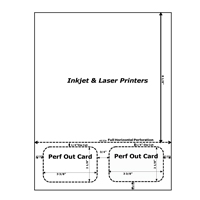


How to create Membership Cards using Word
Blank templates allow users to create custom membership cards, often utilizing a mail merge letter.
Step 1: Find a membership card template:
Download membership cards 1 per page
Download membership cards 2 per page
Step 2: Format membership card:
- Click into the letter portion of the sheet.
- Format your document, like you would a letter, including company logo, return address, recipient/member address, and include detailed benefits of membership.
- Click into the image of the membership card. Right click and choose Add Text.
- Use the Mail Merge Wizard, if desired, to have the membership cards filled with data from mail merge.
- Personalize card as desired with graphics and / or text. To remove printed border around membership card, select card, right click, choose Format AutoShape, and Change Line Color to No Color.
- Go to File, then Print Preview to view before printing.
Step 3: Print.